
At your New template's Footer ( Bottom ) , you will find out your Template designer's Name , Team , Web address and so on.I don't think you love to keep other's names , links at your blog. Aren't you. But As I think you should even keep a link you your template creater's web because he is a one who create that beautiful blogger template and given out it totally free.
How even , it's up to you.
Ex:-

It says ' Test Blog by DragonD -CopyRight @ 2008 Designed by Gaganpreet Singh' and there is a link to his blog.
Now lets find out this part in our Templates codes
1. Edit your Template
2. Copy the Text you want to find out and Find it ( 'Ctrl' + F ) ex:- Gaganpreet Singh
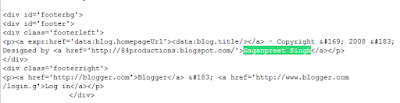
It may be at few locations , but the code that we have to change is at the bottom , under Footer section.
How even , it's up to you.
Ex:-

It says ' Test Blog by DragonD -CopyRight @ 2008 Designed by Gaganpreet Singh' and there is a link to his blog.
Now lets find out this part in our Templates codes
1. Edit your Template
2. Copy the Text you want to find out and Find it ( 'Ctrl' + F ) ex:- Gaganpreet Singh
It may be at few locations , but the code that we have to change is at the bottom , under Footer section.

Here it is , under div id= footer
These text ( ex;- Test Blog by DragonD -CopyRight @ 2008 Designed by Gaganpreet Singh ) are always inside the
<p>
and
</p>
Now if you know some thing about HTML , you can edit it and Insert what ever links , names as you want.
If you don't know any thing about HTML just find out
<p>
and
</p> .
( <p> and </p> which are inside <div id='footer'> and </div> ) Now Type a Sentence. Some thing like 'This blog is created by [yourname] '.........
Now Follow the Safety Saving Steps
Click
These text ( ex;- Test Blog by DragonD -CopyRight @ 2008 Designed by Gaganpreet Singh ) are always inside the
<p>
and
</p>
If you don't know any thing about HTML just find out
<p>
</p> .
( <p> and </p> which are inside <div id='footer'> and </div> ) Now Type a Sentence. Some thing like 'This blog is created by [yourname] '.........
Now Follow the Safety Saving Steps
Click
